
 한국어
한국어
The Desmos calculator in Bluebook
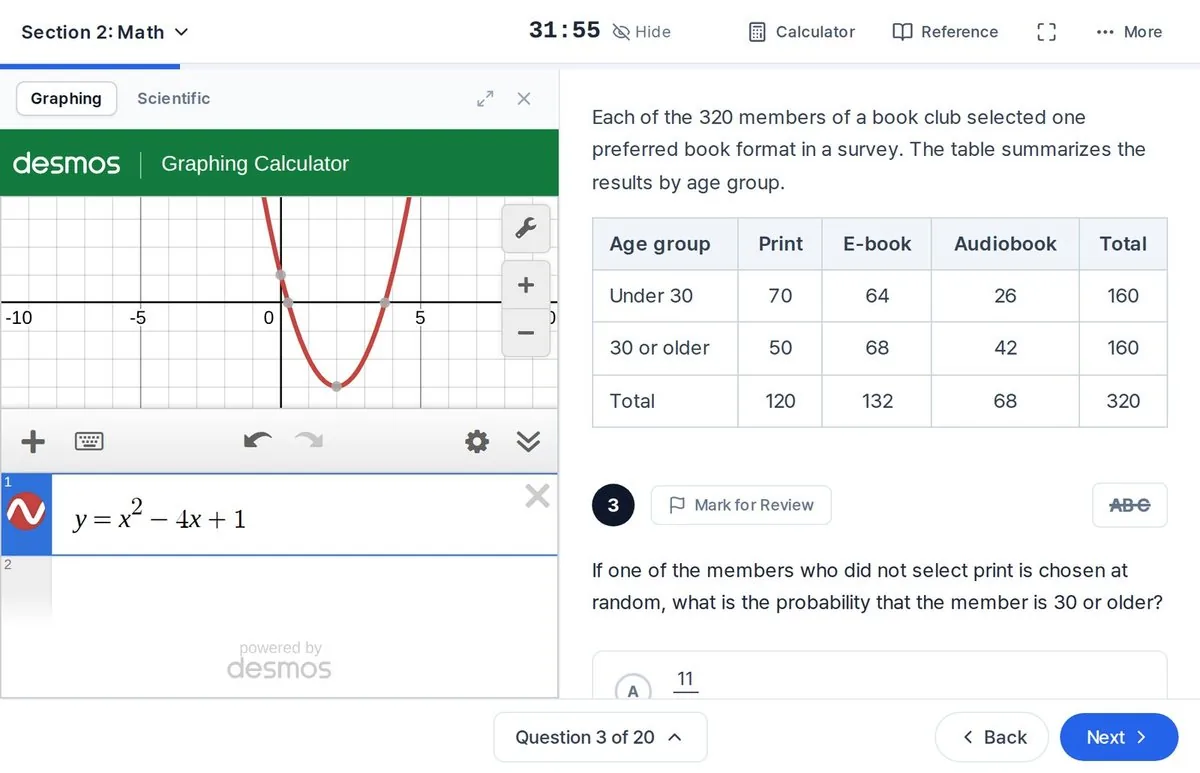
The Bluebook testing app includes an embedded Desmos calculator with a graphing mode and a scientific mode, and you can switch between them at any point in the Math section. That covers both Math modules: 44 questions in 70 minutes. During Reading and Writing, no calculator is available, and a handheld one must stay under your desk.
The version on the test is close to the free one at desmos.com, with a few differences Desmos lists for the SAT:
- Images, folders and notes are disabled in the graphing calculator.
- For exponential, logarithmic and power regressions, the test version turns on log mode automatically.
- The four-function and scientific calculators are the same as the ones on desmos.com.
To practice on the exact configuration, Desmos publishes testing versions of its calculators on its testing page. The Bluebook test preview and full-length practice tests also include the calculator, so you can learn it under real timing.
SAT calculator policy
A calculator is optional. If you bring one, College Board's main rule is that it cannot have a computer algebra system (CAS), meaning it cannot factor, expand or solve equations symbolically. A calculator with "CAS" in the model name is out, and so is any non-CAS model loaded with programs that do symbolic algebra.
Allowed
- The embedded Desmos calculator in Bluebook (graphing or scientific)
- Graphing calculators without CAS, such as TI-Nspire models without "CAS" in the name
- Scientific calculators
- Four-function calculators (allowed, but not recommended because most ignore order of operations)
Not allowed
- CAS calculators, for example TI-Nspire CAS, TI-Nspire CX II CAS, TI-89 and TI-92 models, HP Prime, Casio ClassPad
- Apps, menus or programs that do symbolic algebra
- Calculators with a QWERTY keyboard, paper tape, or a power cord
- Phones, tablets, laptops, pen-input devices, and anything with Wi-Fi, Bluetooth, cellular, a camera or recording
College Board no longer keeps a list of approved graphing calculators, so check the prohibited list against your model. A few more rules apply on test day:
- Delete algebra programs and stored documents before the test.
- Turn all sound off, keep the cover under your desk, and do not share your calculator.
- Bring fresh batteries. If your calculator fails and you have no backup, you can keep going with the built-in Desmos.
- Using a calculator to share information or to remove test content gets you dismissed and your scores canceled.
AP Exams have a separate calculator policy that allows some CAS calculators. A calculator you used on an AP Exam is not automatically allowed on the SAT. College Board says the SAT policy can be updated as often as once a year, so check the current policy before test day.
Desmos techniques for SAT Math
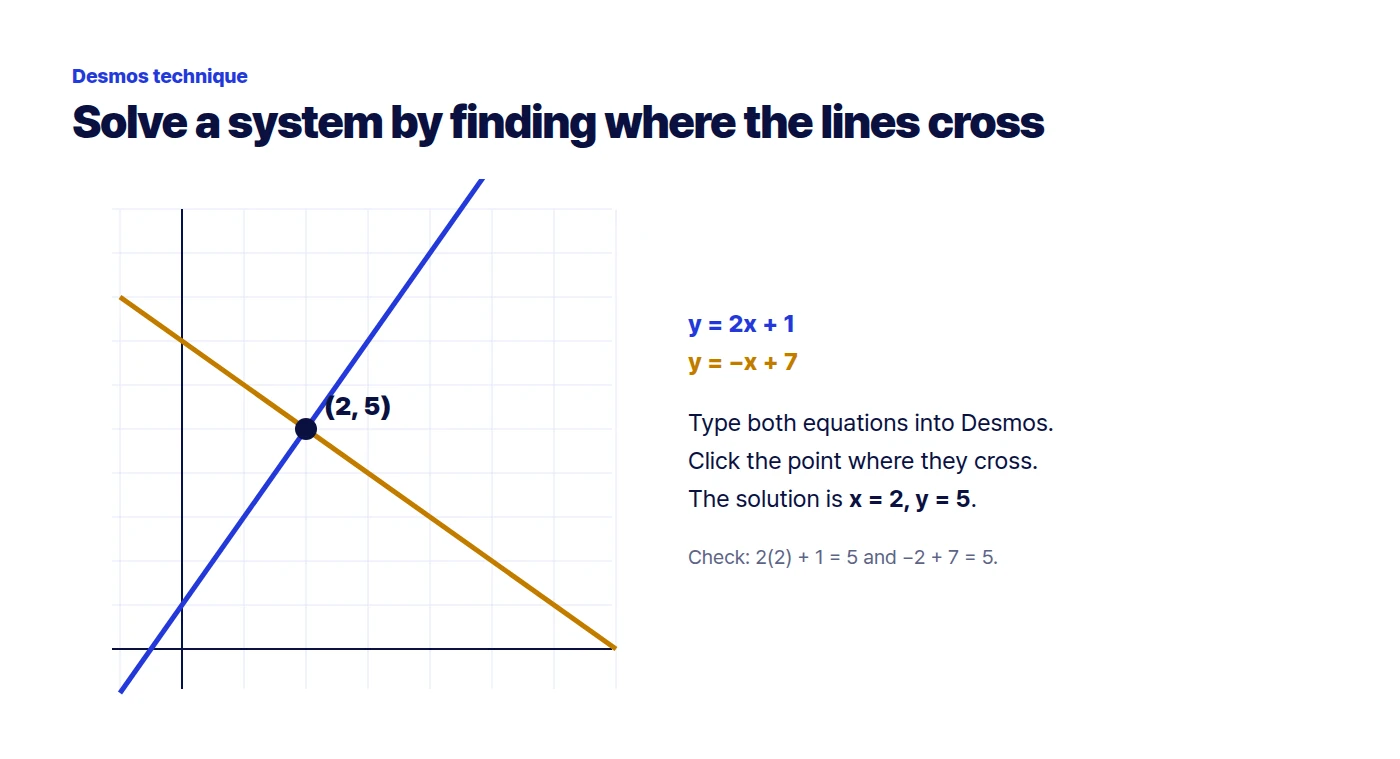
These are the moves we teach first, because they turn several common question types into a few seconds of typing. Try each one at desmos.com while you read.
Solve a system by finding the intersection
Type each equation on its own line, for example y = 2x + 1 and y = -x + 7. Click where the lines cross and Desmos labels the point: (2, 5), so x = 2 and y = 5. If no point appears, zoom out; the intersection may be off screen. Parallel lines mean no solution, and lines that sit on top of each other mean infinitely many.
Find zeros and the vertex of a quadratic
Type y = x^2 - 6x + 5. Desmos shows gray points at the x-intercepts and the vertex; click them to read the coordinates. The zeros are x = 1 and x = 5, and the vertex is (3, -4), which is also the minimum value. This works even when the quadratic does not factor nicely.
Solve a one-variable equation
Graph each side as its own function. For 3(x - 4) = 2x + 5, enter y = 3(x - 4) and y = 2x + 5. They meet at (17, 39), so x = 17. The same trick handles equations with radicals or absolute values, where solving by hand invites sign errors.
Use a slider for an unknown constant
When a question asks for the value of a constant, type the equation with a letter and let Desmos add a slider. For "x^2 - 6x + c = 0 has exactly one real solution," graph y = x^2 - 6x + c and drag c until the vertex just touches the x-axis: c = 9. Confirm the algebra afterward (the discriminant 36 - 4c equals 0).
Test equivalent expressions
For "which expression is equivalent to (x + 3)^2 - 4," graph the original and each answer choice. The one whose graph lies exactly on top of the original, here x^2 + 6x + 5, is equivalent. Turn graphs on and off one at a time, and check a couple of points in a table, since two curves can look identical in one window and split apart elsewhere.
Evaluate a function
Define f(x) = 2x^2 - 5x + 1 on one line and type f(3) on the next. Desmos returns 4. Nested values like f(g(2)) work the same way once both functions are defined.
Run a regression from a table
Add a table from the + menu and enter the data in the x1 and y1 columns, for example (1, 3), (2, 5), (3, 8), (4, 10), (5, 13). On a new line type y_1 ~ mx_1 + b with a tilde, not an equals sign. Desmos fits the line and reports m = 2.5 and b = 0.3. For exponential data use y_1 ~ ab^x_1.
Compute statistics
Type a list in square brackets inside a function: mean([23, 27, 27, 32, 35, 36, 52]) gives about 33.14, and median(...) on the same list gives 32. This is faster and safer than adding seven numbers by hand.
Check an answer before moving on
After solving by hand, substitute your answer: define the expression as a function and evaluate it, or graph both sides and confirm the intersection. Ten seconds of checking is worth it on questions where a dropped negative sign leads straight to a wrong answer choice.
Typing in Desmos quickly
| To enter | Type | Example |
|---|---|---|
| Exponent | ^ | x^2 |
| Fraction | / | (x+1)/(x-2) |
| Square root | sqrt | sqrt(16) |
| Absolute value | | or abs | abs(x - 3) |
| Pi | pi | 2*pi*r |
| Inequality | <= or >= | y >= 2x + 1 |
| Subscript | _ | y_1 |
| Regression | ~ | y_1 ~ mx_1 + b |
| Distance between points | distance() | distance((1,2),(4,6)) |
- If a question uses t, n or k as the variable, retype it with x so Desmos graphs it instead of creating a slider.
- For trigonometry, check the angle setting under the wrench (graph settings) icon. SAT questions use both degrees and radians, so match the setting to the question.
- When a student-produced response needs a fraction, use the fraction toggle next to a result to see the exact value instead of a rounded decimal.
When not to use the calculator
College Board itself notes that some Math questions are better solved without a calculator. Opening Desmos for 3 x 7 + 2 costs more time than it saves. As a rule of thumb, reach for it when the setup is already clear and the remaining work is graphing, solving or arithmetic you could get wrong.
Desmos cannot tell you what a question is asking. Questions about what the slope means in context, which expression represents a situation, or how a change in one quantity affects another are about reading and reasoning. Work those out on scratch paper first; use Desmos to confirm.
If you bring a handheld calculator, practice with that same model. Switching tools on test day is a common source of slow, uncertain work.
How to practice with Desmos
Spend a week doing every Math practice question with desmos.com open, even ones you can solve by hand, so the keystrokes become automatic. Then take full-length tests in Bluebook, where the calculator sits inside the test window exactly as it will on test day.
For more timed practice, the Solo Prep mock test runs Bluebook-style adaptive tests with instant scoring and accuracy by question type, which shows whether calculator-friendly topics such as systems and quadratics are where you lose points. To see how Math is split across domains, read the structure page; for books that teach these methods, see Digital SAT prep books.
FAQ
Can I use a calculator on every SAT Math question?
Yes. The Desmos calculator is available throughout both Math modules, and an approved handheld calculator can be used anywhere in the Math section. Calculators are not used in Reading and Writing.
Is the TI-84 allowed on the SAT?
College Board no longer publishes a list of approved models. The rule is that the calculator must not have CAS and must not carry programs that do symbolic algebra; TI-84 Plus models have no CAS, so they fit that rule. Check the prohibited list before test day.
Is the TI-Nspire allowed on the SAT?
TI-Nspire models without "CAS" in the name are acceptable. The TI-Nspire CAS and TI-Nspire CX II CAS are prohibited.
Is the Desmos on the SAT the same as desmos.com?
Almost. On the test, images, folders and notes are disabled in the graphing calculator, and log mode is turned on automatically for some regressions. Desmos offers testing versions on its website for practice.
What happens if my calculator stops working during the test?
If you have no backup, you can continue with the Desmos calculator built into Bluebook.
Sources